Wanover: Mastering the Futuristic Aesthetic Without Losing Readability
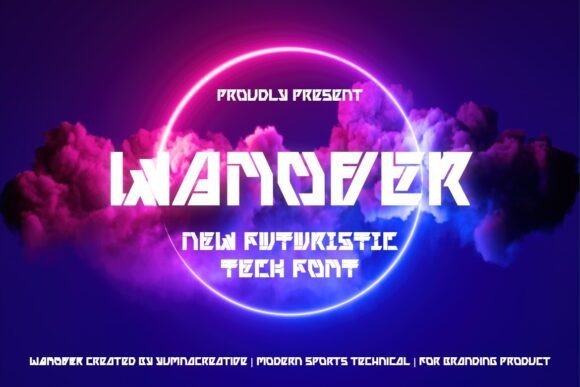
In the crowded landscape of digital design, first impressions are often dictated by typography. When a project demands a cutting-edge, sci-fi look, many creators instinctively reach for Wanover. This futuristic techno font is celebrated for its sleek, sharp edges and modern design, offering a digital, high-tech feel that instantly signals innovation. However, the very characteristics that make Wanover appealing—its bold, clean letters and geometric precision—can become liabilities if misunderstood or misapplied. Whether you are a seasoned graphic designer, a startup founder crafting a logo, or a blogger looking to spice up your headers, understanding the nuances of this typeface is crucial for maintaining professional quality.
The Allure and The Trap of High-Tech Typography
Wanover is not just a font; it is a statement. Its structure is built on the premise of forward momentum, with angles and lines that suggest speed and efficiency. This makes it ideal for titles, logos, and tech-themed designs where the goal is to convey authority and modernity. Yet, a common mistake among beginners and even some professionals is assuming that "futuristic" automatically translates to "legible." The sharp edges and stylized forms can reduce readability, especially at smaller sizes or in long paragraphs. Using Wanover for body text is a frequent error that leads to user fatigue. Visitors may struggle to parse the information, causing them to leave your site or disregard your message entirely.
To avoid this pitfall, reserve Wanover strictly for display purposes. Use it for headlines, short taglines, or prominent logo elements where the text is large enough for the intricate details to be appreciated without straining the eye. Pair it with a neutral, highly readable sans-serif font for the main content. This contrast ensures that while your brand looks innovative, your communication remains clear and accessible.
Misjudging Context and Brand Alignment
Another overlooked detail is the contextual fit of the font. While Wanover exudes a cyberpunk or high-tech vibe, it is not universally appropriate. Entrepreneurs in traditional sectors such as law, healthcare, or organic farming might find that the aggressive, digital aesthetic clashes with their brand values of trust, warmth, or natural simplicity. Applying a techno font to a wellness blog or a legal firm’s website can create cognitive dissonance, making the brand appear out of touch or insincere.
Before downloading or purchasing Wanover, ask yourself if the visual language aligns with your core message. If you are designing for a gaming tournament, a software launch, or an electronics retailer, the fit is perfect. For other industries, consider whether the "sci-fi look" enhances or detracts from your credibility. A better approach is to use Wanover sparingly as an accent rather than the primary typographic voice, ensuring it complements rather than overwhelms the brand identity.
Technical Pitfalls in Digital Implementation
From a technical standpoint, designers often overlook how screen resolution and rendering affect sharp-edged fonts. Wanover’s clean, bold letters rely on precise geometry. On low-resolution screens or when compressed improperly for web use, these sharp edges can appear jagged or blurred, ruining the sleek aesthetic. This is particularly problematic for mobile users, who constitute a significant portion of web traffic. A logo that looks crisp on a 4K monitor may look pixelated and amateurish on a smartphone.
To mitigate this, always test your designs across multiple devices and screen sizes. Ensure you are using web-optimized font formats such as WOFF2 for superior compression and clarity. Additionally, pay attention to letter spacing, or kerning. Techno fonts often have unique spacing requirements. Default settings may cause letters to overlap or drift too far apart, breaking the visual cohesion. Adjust the tracking manually to ensure each character stands distinct yet connected, preserving the font’s structural integrity.
Licensing and Ethical Usage
A critical but frequently ignored aspect of using specialized fonts like Wanover is licensing. Many creators assume that downloading a font from a free repository grants them unrestricted commercial rights. This is rarely the case. Using a personal-use-only license for a client project or a commercial product can lead to legal complications and unexpected costs. Always verify the license terms before integrating Wanover into any paid work.
Check if the license covers web embedding, app integration, or print media. Some licenses require separate purchases for different mediums. Investing in the proper license not only protects you legally but also supports the type designers who spend hours refining these digital tools. It is a small cost that ensures peace of mind and professional integrity.
Overdesigning and Visual Clutter
Because Wanover is visually striking, there is a temptation to add excessive effects such as heavy drop shadows, neon glows, or complex gradients. While these effects can enhance the sci-fi theme, overdoing them results in visual clutter that distracts from the message. The strength of Wanover lies in its inherent design; it does not need excessive embellishment to stand out.
Adopt a minimalist approach. Let the font’s sharp edges and bold structure do the heavy lifting. Use color strategically to highlight key words, but avoid overwhelming the viewer with too many visual stimuli. A clean background with high contrast will make the font pop more effectively than a busy, effect-laden composition. Remember, sophistication often comes from restraint.
Making the Right Choice for Your Project
Ultimately, choosing Wanover should be a deliberate decision based on your project’s goals. Evaluate your audience’s expectations and the medium through which they will encounter your design. If you are targeting a tech-savvy demographic that appreciates modern aesthetics, Wanover is an excellent choice. However, ensure you balance its futuristic appeal with usability and clarity.
- Test readability: Ensure text is legible at various sizes and distances.
- Check compatibility: Verify how the font renders on different devices and browsers.
- Respect licensing: Confirm you have the right permissions for your specific use case.
- Maintain balance: Pair with simpler fonts and avoid excessive decorative effects.
By avoiding these common mistakes and applying practical corrections, you can harness the power of Wanover to create designs that are not only visually stunning but also effective and professional. The goal is to communicate innovation without sacrificing clarity, ensuring your message resonates with your audience in the most impactful way possible.